Working with Datasets
Contents
Working with Datasets
HDF5 datasets are the objects that actually save user data in storage. The meta-info,
the Datatype and Dataspace of a dataset, describe the element type
and the layout of those elements.
For both clarity and flexibility, HIPP defines two sets of API for dataset operations
DatasetManager: a manager for all datasets in a group. The manager provides high-level API which are sufficient for most commonly I/O patterns. Datatype and dataspace are not directly manipulated by users but they are implicitly deduced by the data object.GroupandDataset: more detailed controls over datasets. Dataset creation, opening, writing/reading processes are separately handled with detailed datatype and dataspace controls.
In the following sections, we begin with the high-level DatasetManager API
and then move to the detailed API for datasets.
Using the Dataset Manager
The method Group::datasets() returns a dataset manage typed
DatasetManager
for the caller group. For example, we create a new file and get a group manager
for it (i.e., its root group):
H5::File f1("f1.h5", "w");
auto dsets = f1.datasets();
The dataset manager can tell whether or not a dataset of given name exists under
the group. For example, because f1 is empty now, the following assertion
passes:
assert( !dsets.exists("dataset_A") );
The following parts demonstrate how to use the manager to
Writing/reading data of either numerical types or strings.
Subsetting the data to write/read.
Put/Get Numerical Data
Dataset managers support various types of data, including
single scalar value, such as
int,float;GeneralArrayTraitscompliant container of scalar values, such asstd::vectorwith scalarvalue_type;RawArrayTraitscompliant object of scalar values, such as raw arrays (int [3],float [2][3]), orstd::arraywith arbitrary nesting depth (std::array<int, 3>,std::array<std::array<int, 3>, 2>);GeneralArrayTraitscompliant container ofRawArrayTraits,such as std::vector< std::array<int, 3> >.
For example, consider the following objects to be written into a file:
short s;
vector<double> d10(10);
int i5[5];
long l34[3][4];
array<float, 3> f3;
vector<array<int, 3> > i83(8);

// We initialize them, for example, for i83
for(size_t i=0; i<8; ++i)
    for(size_t j=0; j<3; ++j)
        i83[i][j] = i*3+j;
To write those objects into a file, simply call the method DatasetManager::put(name, data)
where name is the dataset name in the file and data is an object to be written:
dsets.put("s",      s);                     // Create a new dataset and write to it
dsets.put("d10",    d10);
dsets.put("i5",     i5);
dsets.put("l34",    l34);
dsets.put("f3",     f3);
dsets.put("i83",    i83);
The call automatically creates the dataset and write data into it. If it already exists, the call overwrite it. In the later case the data in memory must have consistent datatype and dataspace to the existing dataset.
To load data from the file, call DatasetManager::get(name, data) where the dataset content is
written into data. If the outer-most container is a std::vector , it is resized to exactly
fit the dataset. If the resize is not feasible, an HIPP::ErrorLogic exception is thrown:
dsets.get("s",      s);                     // Read back the data.
dsets.get("d10",    d10);
dsets.get("i5",     i5);
dsets.get("l34",    l34);
dsets.get("f3",     f3);
dsets.get("i83",    i83);
The get method has an additional single-argument version:
s = dsets.get<short>("s");
f3 = dsets.get<array<float, 3> >("f3");
In this version, an object whose type is given by the template argument is default-constructed, passed into the two-argument version to get its data, and returned.
The content of file shown by h5ls -r f1.h5 is like:
/d10                     Dataset {10}
/f3                      Dataset {3}
/i5                      Dataset {5}
/i83                     Dataset {8, 3}
/l34                     Dataset {3, 4}
/s                       Dataset {SCALAR}
Put/Get Strings
Strins have very special types. C-style strings are usually stored in raw arrays of
characters, if their lengths have a predefined upper bound, or otherwise they are stored
in heap memory segments and manipulated by pointers. In C++, strings are usually represented
by std::string.
For the sake of simplicity, the dataset manager supports the following types of string data:
Single string, such as
std::string,(const) char [N],(const) char *(null-terminated). The single string is represented by ATOMIC STRING datatype in the file.Strings: either a
std::vector<std::string> >instance or(const) char[N_STR][STR_LEN]. The strings are represented by an 1-D array of ATOMIC STRING datatype in the file.
For example, consider the following “string object”:
string str = "foo";
vector<string> str4 = {"top", "bottom", "left", "right"};
char raw_str[16] = "foo";
char raw_str4[4][16] = {"top", "bottom", "left", "right"};
To write them into the file, call DatasetManager::put_str(name, data). The library will figure out the correct datatype and dataspace for each of them:
dsets.put_str("str", str);
dsets.put_str("str4", str4);
dsets.put_str("raw_str", raw_str);
dsets.put_str("raw_str4", raw_str4);
To load back the data, call DatasetManager::get(name, data) instead:
dsets.get_str("str", str);
dsets.get_str("str4", str4);
dsets.get_str("raw_str", raw_str);
dsets.get_str("raw_str4", raw_str4);
Only in the std::string and std::vector< std::string > cases, the objects
are auto-resized to fit the dataset. In other cases, the object must be large enough
to hold the dataset.
The std::string or std::vector< std::string > case also has single-argument version, where
the loaded string or strings are returned:
str = dsets.get_str<string>("str");
str4 = dsets.get_str<vector<string> >("str4");
The content of the file shown by h5ls -r f1.h5 is like:
/raw_str                 Dataset {SCALAR}
/raw_str4                Dataset {4}
/str                     Dataset {SCALAR}
/str4                    Dataset {4}
Subsetting the Data
The dataset manager provides three methods for the case that only a subset of the whole dataset is the target of reading.
The call of DatasetManager::at(name, data, coord) loads a single element
at given coordinate coord in the dataset named name into data.
For example, the following codes load an element at position (1,2):
int i_value;
dsets.at("i83", i_value, {1,2});

pout << i_value, endl;            // => 5
The call DatasetManager::ats(name, data, coords) loads a set of points
into a container object data. The coordinates of the points is given by
coords, which is typed Points and can be initialized with the
number of points and the starting address of the coordinate array:
vector<int> i_values;
vector<hsize_t> coords = {
    0,0,
    1,1,
    2,2};

dsets.ats("i83", i_values, {3, coords.data()});

pout << i_values, endl;           // => 0,4,8
The call of DatasetManager::slab(name, data, slab) loads a hyperslab.
The geometry of the hyperslab is specified by slab that is typed
Hyperslab and can be initialized by the starting coordinate and
the number of elements at all dimensions.
For example, the following codes load a hyperslab [1:(1+2)][0:(0+3)]:
dsets.slab("i83", i_values, {{1, 0}, {2, 3}});

pout << i_values, endl;           // => 3,4,5,6,7,8
For ats and slab, the argument data must has consistent size to
the selected part of data. If it is a std::vector of numerical or RawArrayTraits
compliant type, it is auto-resized to fit the selection.
For writing, we have DatasetManager::put_at, DatasetManager::put_ats, and DatasetManager::put_slab. The three calls require that the dataset is already existing in the file, and overwrite the selected part.
Datatype
A Datatype instance describes the detail
(i.e., size, bit-level interpretation and conversion) of a data element in
the storage.
HIPP predefines a set of commonly used datatypes that corresponds to the native types in C++:
C++ Type |
Corresponding |
|---|---|
|
|
|
|
|
|
|
|
|
|
|
Standard datatypes are defined for platform-independent storage, with suffix
Ffor floating-point number,Ifor signed integer andUfor unsigned interger;BEfor big-endian byte order andLEfor the little endian.
Little-endian |
Big-endian |
|---|---|
The special datatype, C_S1_T, is ATOMIC STRING datatype, which describe a C-style
string with fixed length.
The native datatypes are sufficient for most applications. The standard datatypes are defined only for rare cases where the data element in the file has to be in specific format.
Users may define their own datatype based on existing ones to describe more complicated data element, such as array or structured record.
Using Predefined Datatypes
All the predefined datatypes are global static variables. For example,
the datatypes that correspond to double and int can be referred to
as:
const H5::Datatype &dt_f = H5::NATIVE_DOUBLE_T,
     &dt_i = H5::NATIVE_INT_T;
You cannot modify a predefined datatype, but you can retrieve its details, for example, its size and and datatype class:
assert( dt_f.get_class() == dt_f.cFLOAT );
assert( dt_i.get_class() == dt_i.cINTEGER );

pout << "size of float type = ", dt_f.size(),
        ", size of int type = ", dt_i.size(), endl;
The output is:
size of float type = 8, size of int type = 4
The datatype class is copy-constructable and copy-assignable - but the copy is
shallow, i.e., the resulting instance refers to the same underlying HDF5 resource
(operator== returns true).
To make a deep copy, use the :expr`Datatype::copy()` method - the resulting instance
refers to another HDF5 resource but describes the same data layout
(Datatype::equal() returns true):
auto dt_f2 = dt_f;              // Shallow copy, refer to the same datatype.
auto dt_f3 = dt_f.copy();       // Deep copy, get a new datatype.

assert( dt_f == dt_f2 && dt_f.equal(dt_f2) );
assert( dt_f != dt_f3 && dt_f.equal(dt_f3) );
Atomic String Datatype
To get a datatype that describes a fixed-length C-style string,
call Datatype::resized(n) on the instance C_S1_T with
desired string length n. For example, to contain the following string
"foo", which has 4 characters including the null-terminator, you
may define a larger string datatype of length 10:
const char s[] = "foo";
auto dt_s = H5::C_S1_T.resized(10);

assert( dt_s.get_class() == dt_s.cSTRING );
pout << "size = ", dt_s.size(), endl;
The output is:
size = 10
Array Datatype
To get a datatype that describes a C-style raw array, call
Datatype::create_array(dims) on an existing element datatype with
desired dimensions dims.
For example, the following codes create the datatype for int arr[3][4]:
int arr[3][4];
auto dt_a1 = H5::NATIVE_INT_T.create_array({3,4});
The library also defines another method Datatype::create_array_for<T>(), which takes a template argument and infers the element datatype and dimensions from it. Thus, the above call is equivalent to:
auto dt_a2 = H5::NATIVE_INT_T.create_array_for< decltype(arr) >();
To retrieve the array rank and dimensions, call Datatype::array_ndims() and Datatype::array_dims(), respectively:
pout << "rank = ",   dt_a1.array_ndims(),
        ", dims = ", dt_a1.array_dims(), endl;
The output is:
rank = 2, dims = Dimensions{3,4}
Compound Datatype
Structured types in C++ are usually defined to describe objects with multiple
attribute. For example, the following type S has four fields a, b,
c, and d:
struct S {
    int a;
    float b;
    double c[2][3];
    std::array<int, 2> d;
} comp;
To define the HDF5 datatype for a structured type, first,
call Datatype::create_compound(size)
with desired byte size to get an empty datatype, and then, call
Datatype::insert(name, offset, dtype) to insert a new
field whose name, byte offset and datatype are specified by the three arguments,
respectively. If the type of the field has a predefined HDF5 native datatype
counterpart (i.e., numerical scalar, see
Native Datatypes),
or the field is a raw array of such a numerical scalar, you may just
pass a pointer to that class member, from which the offset and datatype are
inferred automatically:
auto dt_comp1 = H5::Datatype::create_compound(sizeof(S));
dt_comp1.insert("a", dt_comp1.offset(&S::a), H5::NATIVE_INT_T)
    .insert("b", &S::b)
    .insert("c", &S::c)
    .insert("d", &S::d);
Note that insert returns a reference to the instance itself, so that multiple
calls can be chained.
If all the fields are known when constructing the compound datatype, it is
simpler to use another overload of create_compound:
auto dt_comp2 = H5::Datatype::create_compound(
    "a", &S::a,     "b", &S::b,
    "c", &S::c,     "d", &S::d);
Here, for each class field, we pass its name and pointer to the method. The library automatically identifies the datatype size, the offsets and datatypes of all fields.
Note that the order of the fields does not matter. It is not necessary to specify all fields, i.e., useless field may be ignored.
To retrieve the member information in a compound datatype, use Datatype::nmembers() for the total number of fields, Datatype::member_index(name) for the index of a field with given name, Datatype::member_name(idx), Datatype::member_class(idx) and Datatype::member_offset() for the name, class and offset, respectively, of a field with given index:
pout <<
    "no. members = ",            dt_comp1.nmembers(), '\n',
    "index of a = ",             dt_comp1.member_index("a"), '\n',
    "name of the 2nd member = ", dt_comp1.member_name(1), '\n',
    "3nd member class,offset = ", dt_comp1.member_class(2), ',',
        dt_comp1.member_offset(2), '\n';
The output is:
no. members = 4
index of a = 0
name of the 2nd member = b
3nd member class,offset = 10,8
Map C++ Types to HDF5 Datatypes
To aid the meta-programming, HIPP defines mappings from C++ types to HDF5 Datatypes.
The method Datatype::from_type<T>() takes a template argument T and
returns the corresponding HDF5 Datatype instance. This works for all C++ types
with corresponding predefined HDF5 native datatypes
(i.e., numerical scalar, see Native Datatypes),
or RawArrayTraits compliant type with any of such scalar as element.
For example, the following codes map int, float and double [3][4] to
the corresponding HDF5 datatype:
auto dt_int =     H5::Datatype::from_type<int>(),
    dt_float =    H5::Datatype::from_type<float>(),
    dt_double34 = H5::Datatype::from_type<double[3][4]>();
For buffer-like objects such as GeneralArrayTraits compliant ones,
the method Datatype::from_buff(buff) returns the datatype of its element.
For example, the following buff1, buff2``and ``buff3 all have element
datatype dt_int = NATIVE_INT_T:
vector<int> buff1;
std::array<int, 3> buff2;
int buff3[3][4];
dt_int = H5::Datatype::from_buff(buff1);
dt_int = H5::Datatype::from_buff(buff2);
dt_int = H5::Datatype::from_buff(buff3);
The Geometry Types
To aid the description of dataspaces, HIPP defines the following geometry types:
Dimensions: describes the dimensions of a dataspace or the coordinates of a point in a dataspace.Points: describes the coordinates of a set of points in a dataspace.Hyperslab: describes a hyperslab.
Each of them is described by a single section in the following.
Dimensions
A Dimensions instance describes the dimensions of a dataspace or the
coordinates of a point in a dataspace.
Several constructors are defined for the Dimensions type:
H5::Dimensions dims1,                   // rank = 0.
    dims2 {3,4},                        // rank = 2, dimensions = {3,4}.
    dims3(vector<size_t>{3,4}),         // rank = 2, dimensions = {3,4}.
    dims4(dims3.data(), dims3.ndims()), // copy from a buffer.
    dims5 = dims4;                      // copy from another Dimensions.
To reset the values of a Dimensions instance,
either call Dimensions::set() with argument(s) the same as the constructors,
or copy-assign from another Dimensions instance:
dims1.set({3,4});
dims1.set(vector<size_t>{3,4});
dims1.set(dims3.data(), dims3.ndims());
dims1 = H5::Dimensions {3,4};           // copy assignment.
The Dimensions type has methods that are similar to std::vector.
For example, you may
push-back an element with Dimensions::push_back() , causing the rank increased by 1.
resize the object by Dimensions::resize().
visit its elements by
[].
dims1.push_back(5);                     // {3,4,5}.
dims1.resize(4); dims1[3] = 6;          // {3,4,5,6}.
To visit the object as a “range”, you can
get the buffer address using Dimensions::data() and the rank using Dimensions::ndims().
Get the range iterators using Dimensions::begin() and Dimensions::end().
Retrieve the values as a
std::vectorusing Dimensions::as_vector().Print the object by streaming it into a
std::ostreamor other stream-like objects.
H5::Dimensions::value_t *data = dims1.data();
size_t ndims = dims1.ndims();
vector<H5::Dimensions::value_t> &vec = dims1.as_vector();       // get a vector {3,4,5,6}.
pout << "dims1 = {", pout(data, data+ndims), "}\n";             // print dims1 = {3,4,5,6}.
pout << "dims1 = {", pout(dims1.begin(), dims1.end()),"}\n";    // the same.
pout << dims1, endl;                                            // print the object.
The method Dimensions::empty() tests whether or not the dimensions is empty, i.e., rank = 0.
operator== can be used to check the equality of two Dimensions objects,
i.e., whether or not they have the same rank and dimensions.
Dimensions::n_elems() get the total number of elements in the space, i.e., the
products of all dimensions:
assert( !dims2.empty() );           // empty check.
assert( dims2 == dims3 );           // equality check.
assert( dims2.n_elems() == 3*4 );   // total no. of elements.
Points
A Points instance describes the coordinates of a set of points in a dataspace.
You can construct a instance with different ways:
H5::Points::value_t coords[] = { 0,1,  2,3, 4,4 };
H5::Points pts1,            // 0 points.
    pts2(3, coords),        // 3 points whose coordinates are {0,1}, {2,3}, {4,4}, respectively.
    pts3(3, 2, coords);     // also specify the rank of the space.
Note that for pts2 we ignore the rank of the space, which is to be determined
by the context when you use the instance.
Note that the Points instance does not hold the data - it only refers
to buffer passed to the constructor. If the buffer is destroyed or changed,
the Points object may be invalid.
To retrieve the pointer to the coordinates buffer, the number of points and the rank of the space, call the corresponding methods:
pts1.coords();              // => a pointer to the coords array.
pts1.n_points();            // => no. of points.
pts1.n_dims();              // => the rank of the space.
Hyperslab
A Hyperslab instance describes a hyperslab, i.e., equal-extent blocks
with regular stride along each dimension.
To fully describe a hyperslab, four parameters are needed:
start: the starting coordinates of the first block.count: the number of block along each dimension.stride: the stride between blocks along each dimension.block: the extent of a block.
The following figure demonstrates a typical hyperslab in a dataspace. The dataspace
is a simple array with extents {8,12}. The hyperslab starts at coordinates {0,1}.
Blocks in the hyperslab have stride {4,3}. The whole hyperslab has {2,4} blocks
and each block has dimensions {3,2}.
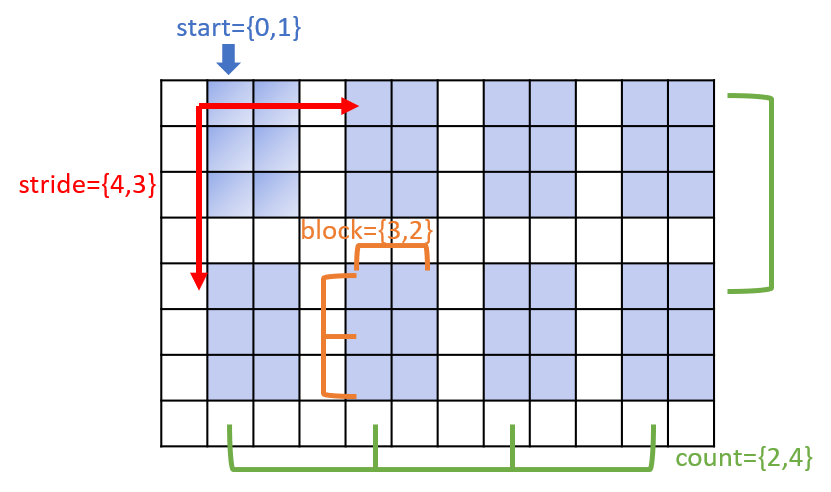
Fig. 8 A hyperslab (blue-shaded areas) in a SIMPLE dataspace.
The four parameters are all handled by Dimensions objects.
stride and block are optional - if not specified, it is
assumed to be 1 along each dimension.
Several constructors are defined for Hyperslab:
H5::Hyperslab slab1,                        // rank = 0, empty hyperslab.
    slab2(dims2, {2,3}),                    // rank = 2, start = dims2, count = {2,3}.
    slab3(dims2, {2,3}, {5,10}, {2,2});     // also specify stride = {5,10}, block size = {2,2}.
To retrieve the parameters of a hyperslab, use the corresponding methods:
H5::Dimensions &start = slab1.start(),
    &count  = slab1.count(),
    &stride = slab1.stride(),
    &block  = slab1.block();
Dataspace
A Dataspace instance describes the layout of data elements in storage.
The current version of the HDF5 library supports only SIMPLE dataspace
(i.e., regular array) and several special dataspaces
(all-space, null-space, and scalar-space).
More flexible types of dataspaces may be supported in the future.
Dataspace Creation and Access
The HDF5 library predefines three dataspaces as static member of class Dataspace:
Dataspace::vALL: all data elements in the dataset. The exact meaning depends on the context.Dataspace::vNULL: an empty space, i.e., without any data element.Dataspace::vSCALAR: a scalar space, i.e., containing only a single data element.
For example, the following codes create references to these three predefined variables:
auto & dsp_all = H5::Dataspace::vALL,
     & dsp_null = H5::Dataspace::vNULL,
     & dsp_scalar = H5::Dataspace::vSCALAR;
To create a new dataspace, define a Dataspace instance by passing the
shape (i.e., dimensions) of it:
H5::Dataspace dsp1 = {2,3},                     // dims = {2,3}.
    dsp2 ( vector<hsize_t>{2,3} ),              // using vector.
    dsp3 ( H5::Dimensions{2,3} ),               // using Dimensions.
    dsp4 = dsp1.copy();                         // exact copy.
All the above four dataspaces have ndims = 2 and dims = {2, 3}.
You may print a Dataspace instance by streaming it into a stream-like
object:
pout << dsp1, '\n',
        dsp2, '\n',
        dsp3, '\n',
        dsp4, endl;
The output is:
Dataspace{type=SIMPLE, dims={2,3}, maxdims={2,3}}
Dataspace{type=SIMPLE, dims={2,3}, maxdims={2,3}}
Dataspace{type=SIMPLE, dims={2,3}, maxdims={2,3}}
Dataspace{type=SIMPLE, dims={2,3}, maxdims={2,3}}
The method Dataspace::get_type() returns the class of the dataspace. It can be either Dataspace::cNULL, Dataspace::cSCALAR, or Dataspace::cSIMPLE:
assert( dsp_null.get_type() == dsp_null.cNULL );
assert( dsp_scalar.get_type() == dsp_scalar.cSCALAR );
assert( dsp1.get_type() == dsp1.cSIMPLE );
To retrieve the shape of a dataspace instance, call Dataspace::ndims(), Dataspace::dims() and Dataspace::size(). They return the rank, the dimensions, and the total number of elements (i.e., product of dimensions), respectively, of the dataspace:
int ndims = dsp1.ndims();                       // => 2
auto dims = dsp1.dims();                        // => {2,3}
hsize_t size = dsp1.size();                     // => 6
Sub-setting a Dataspace
In special cases where only a subset of a dataset is the I/O target, using the “selection” mechanism on the dataspace is beneficial. By selecting/sub-setting a dataspace, the extents of the dataspace are not changed, but the library maintains extra information about which elements are selected in the dataspace. Then, in the I/O process, only the selected elements in the whole dataset are touched.
HDF5 provides four kinds of selection functions:
All: select all elements in a dataspace. The is the default when a new dataspace is created. (type = Dataspace::selALL_T)
None: none of the elements is selected. (type = Dataspace::selNONE_T)
Hyperslab: select a hyperslab by specifying its start, count, and optionally, stride and block size, at each dimension. (type = Dataspace::selHYPERSLABS_T)
Elements: select a set of elements with given coordinates. (type = Dataspace::selPOINTS_T)
For example, we create a new dataspace shaped {10, 10}:
H5::Dataspace dsp5 {10, 10};
By applying Dataspace::select_none() on it, all elements become un-selected. The method Dataspace::get_select_npoints() allows examination of how many elements/points are selected:
dsp5.select_none();
pout << "no. selected points = \n";
pout << "  none -> ", dsp5.get_select_npoints(), '\n';
The opposite extreme - Dataspace::select_all(), select all elements of a dataspace:
dsp5.select_all();
pout << "  all -> ", dsp5.get_select_npoints(), '\n';
The method Dataspace::select_hyperslab() accepts a Hyperslab
instance, and selects the elements described by that hyperslab. For example,
we select \(3\times 4 = 12\) elements starting at coordinate {2,2}:
dsp5.select_hyperslab({ {2,2}, {3,4} });
pout << "  hyperslab -> ", dsp5.get_select_npoints(), '\n';
The method Dataspace::select_elements() accepts a Points
instance, and selects elements whose coordinates are given the the points.
For example, we select three elements whose coordinates are
{1,1}, {2,3}, {3,5}, respectively:
hsize_t coords[] = {1,1,  2,3,  3,5};
dsp5.select_elements({3, coords});
pout << "  elements -> ", dsp5.get_select_npoints(), '\n';
The selections are demonstrated in the following Fig. 9:

Fig. 9 The selected elements after calls of select_hyperslab() and select_elements().
To retrieve which kind of selection is used, call Dataspace::get_select_type. For example, the “elements” selection is typed Dataspace::selPOINTS_T. The method Dataspace::select_valid() checks whether or not the selection is valid, i.e., all the coordinates are within the extents of the dataspace:
assert( dsp5.get_select_type() == dsp5.selPOINTS_T );
assert( dsp5.select_valid() );
The output is:
no. selected points =
  none -> 0
  all -> 100
  hyperslab -> 12
  elements -> 3
Note that setting a new selection clears the old selection, and then applies
the new selection, i.e., the old and new selections are not combined.
The tutorial section The Geometry Types describes how to create
geometry types such as the Hyperslab and Points.
Dataset Operations
Dataset Creation and Opening
Whatever API to use for dataset creation, required information are: dataset name, datatype and dataspace. HIPP provides three levels of methods for dataset creation, from simple-but-constrained to complex-but-general:
Datatype and dataspace are auto-deduced from the data object. The methods Group::create_dataset_for(name, object) and Group::create_dataset_for_str(name, str_object) are used for this purpose.
Datatype is auto-deduced from the C++ type, dataspace is explicitly specified. The methods Group::create_dataset<T>(name, dataspace) and Group::create_dataset_str(name, shape...) are used in this cases.
Datatype and dataspace are both explicitly specified. This is the most general case - call Group::create_dataset(name, datatype, dataspace) with all the details passed.
The level-1 calls are the most convenient.
For example, assume the following data objects are the targets to dump into a file f1:
short s;
vector<double> d10(10);
int i5[5];
long l34[3][4];
array<float, 3> f3;
vector<array<int, 3> > i83(8);
The allowed types of data objects are the same as those in Using the Dataset Manager.
To create a dataset for any of them, call Group::create_dataset_for() by passing the dataset name and the data object. The library auto-deduces all required information to create that dataset, but no data is actually written. On success, the newly created dataset is returned. If the dataset of that name already exists, it is opened and returned:
f1.create_dataset_for("s",   s);
f1.create_dataset_for("d10", d10);
f1.create_dataset_for("i5",  i5);
f1.create_dataset_for("l34", l34);
f1.create_dataset_for("f3",  f3);
f1.create_dataset_for("i83", i83);
For string-like objects (see Using the Dataset Manager for available types), such as:
string str = "foo";
vector<string> str4 = {"top", "bottom", "left", "right"};
char raw_str[16] = "foo";
char raw_str4[4][16] = {"top", "bottom", "left", "right"};
Call Group::create_dataset_for_str() to create datasets for them:
f1.create_dataset_for_str("str",      str);
f1.create_dataset_for_str("str4",     str4);
f1.create_dataset_for_str("raw_str",  raw_str);
f1.create_dataset_for_str("raw_str4", raw_str4);
The file contents shown by h5ls -r is:
/                        Group
/d10                     Dataset {10}
/f3                      Dataset {3}
/i5                      Dataset {5}
/i83                     Dataset {8, 3}
/l34                     Dataset {3, 4}
/raw_str                 Dataset {SCALAR}
/raw_str4                Dataset {4}
/s                       Dataset {SCALAR}
/str                     Dataset {SCALAR}
/str4                    Dataset {4}
The level-2 calls auto-deduce the datatype from C++ type, but the dataspace is
manually passed. For example, for the above data object s, i83, and
string-like objects, the equivalent level-2 calls are:
f1.create_dataset<short>("s", H5::Dataspace::vSCALAR);
f1.create_dataset<int>("i83", {8,3});

f1.create_dataset_str("str", str.size()+1);
f1.create_dataset_str("raw_str4", 4, 16);
The level-3 call allows user to pass both datatype and dataspace. The level-3 equivalents to the above dataset creation procedures are:
f1.create_dataset("s",   H5::NATIVE_SHORT_T, H5::Dataspace::vSCALAR);
f1.create_dataset("i83", H5::NATIVE_INT_T,  {8,3});

f1.create_dataset("str",      H5::C_S1_T.resized(str.size()+1), H5::Dataspace::vSCALAR);
f1.create_dataset("raw_str4", H5::C_S1_T.resized(16),           {4});
To open an existing dataset, use Group::open_dataset(name) with given
dataset name. For example, to open the dataset “s” created above, write:
auto s_dset = f1.open_dataset("s");
Read/Write Data
Once a dataset is created or opened, read/write operations can be performed on
the Dataset instance.
For example, the following codes write a raw array and a std::vector object
into two newly created datasets, respectively:
long l34[3][4];
vector<double> d10(10);

auto dset_l34 = f1.create_dataset_for("l34", l34),
     dset_d10 = f1.create_dataset_for("d10", d10);

dset_l34.write(l34);
dset_d10.write(d10);
The acceptable data object argument to Dataset::write() are the same as that to Group::create_dataset_for().
The memory data elements to be read/written may have different datatype from the
file data elements, but the implicit conversion must be available.
The memory dataspace may also be different, but the total
number of elements must match that in file. For example, write 10 single-precision
floating-point values to the above dataset, d10, is valid:
float f10[10];
dset_d10.write(f10);
Data elements in raw memory buffer cannot have auto-deduced datatype. User must specify its datatype:
void *ptr_f10 = new float[10];
dset_d10.write(ptr_f10, H5::NATIVE_FLOAT_T);
String-like objects are written by Dataset::write_str() method. Allowed string-like types are the same as those for Group::create_dataset_for_str(). For example, the following codes write a single string and a std::vector of strings into two newly-created datasets, respectively:
string str = "foo";
vector<string> str4 = {"top", "bottom", "left", "right"};

auto dset_str = f1.create_dataset_for_str("str", str),
     dset_str4 = f1.create_dataset_for_str("str4", str4);

dset_str.write_str(str);
dset_str4.write_str(str);
The method Dataset::read() reads the data elements from a dataset to
a data object. The object must have consistent (i.e., convertible) datatype
and the same number of elements. For example, the above dataset dset_l43 is
read by:
dset_l34.read(l34);
Or:
long l12[12];               // Readable if the size matches.
dset_l34.read(l12);
If the argument is a std::vector, it is auto-resized to match the file
dataspace:
vector<long> v1;            // vector is auto-resized.
dset_l34.read(v1);
assert(v1.size() == 12);
The value_type of the std::vector may be a RawArrayTraits compliant
type, as long as its size is a divisor of the size of the file dataspace:
vector<array<long, 4> > v2;
dset_l34.read(v2);
assert(v2.size() == 3);
If the resize is not feasible, a :class:~HIPP::ErrorLogic exception is thrown:
vector<array<long, 5> > v3;
dset_l34.read(v3);          // Fail and throw an ErrLogic.
String-like data object is similar but read through Dataset::read_str()
If the argument is a std::string or std::vector<std::string>, it is auto-adjusted
to fit the file contents:
string s1;
vector<string> v4;
dset_str.read_str(s1);
dset_str4.read_str(v4);
Sub-setting the Data
The sub-setting I/O operations are designed for the cases where only a subset of the whole dataset is the target. We have three sub-setting operations for both reading and writting:
Dataset::read_element() and Dataset::write_element(): read/write a single scalar element at a given coordinate in the dataspace.
Dataset::read_elements() and Dataset::write_elements: read/write elements at a set of given coordinates.
Dataset::read_hyperslab() and Dataset::write_hyperslab(): read/write elements at a hyperslab in the dataset.
As an example, we create a new dataset shaped \({3,4}\) with integer elements:
H5::File f1("f1.h5", "w");

int i34[3][4] {};

auto dset = f1.create_dataset_for("i34", i34);
dset.write(i34);
We write a single element i at the coordinate {0, 1} by Dataset::write_element():
int i = 100;
dset.write_element(i, {0,1});
/*
The dataset becomes
0   100 0   0
0   0   0   0
0   0   0   0
*/
We write two elements of i2 at the coordinates {0,2} and {0,3}, respectively,
by one call of Dataset::write_elements():
int i2[2] = {8, 16};
hsize_t coords[] = {
    0,2,
    0,3};
dset.write_elements(i2, {2, coords});
/*
The dataset becomes
0   100 8   16
0   0   0   0
0   0   0   0
*/
We write 6 elements of i23 into a hyperslab starting at the coordinate {1,1}
and extending {2,3} in the two axes, by Dataset::write_hyperslab():
int i23[2][3] = {0,1,2,3,4,5};
dset.write_hyperslab(i23, {{1,1},{2,3}});
/*
The dataset becomes
0   100 8   16
0   0   1   2
0   3   4   5
*/
The read calls are similar:
int i;
vector<int> v;

dset.read_element(i, {0,1});
dset.read_elements(v, {2, coords});
dset.read_hyperslab(v, {{1,1},{2,3}});
Dataset::read_element() accepts a reference to a scalar as its first
argument, while Dataset::read_elements() and Dataset::read_hyperslab
accepts a std::vector. The vector is auto-resized to fit the number of loaded
elements.